Orientation
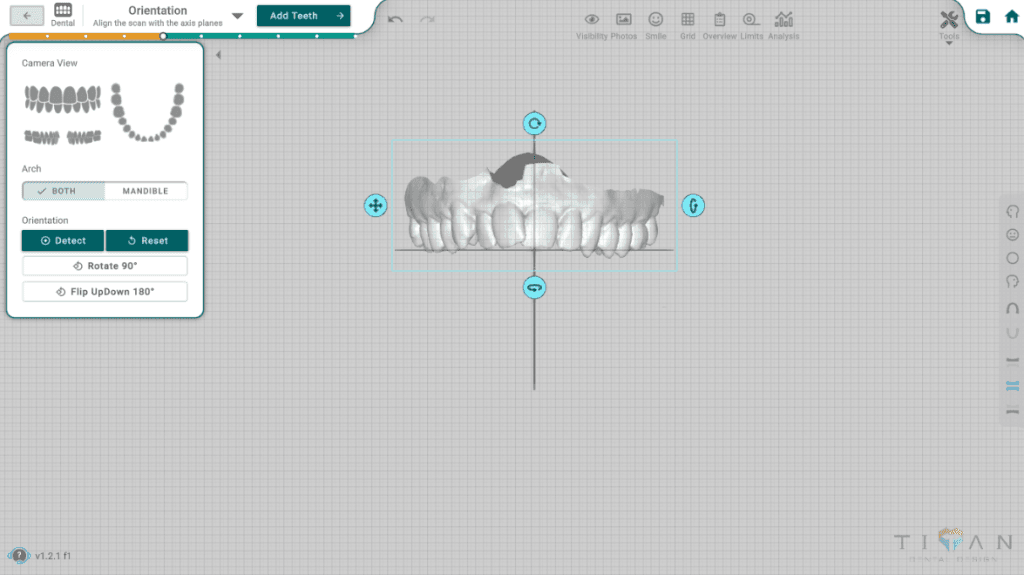
In this phase, users must align the models in the specified plane to ensure correct positioning according to the coordinate axis, using the following buttons:
- Arch Both - selects both models as the target of the manual controls (Rotate, Flip and the drag widget)
- Arch Mandible - selects the mandible model only as the target of the manual controls
- Orientation Detect - automatically calculates the correct orientation of the models from the scan data
- Orientation Reset - restores the models' original orientation
- Rotate 90 degrees - rotates the selected models by 90 degrees
- Flip Up Down 180 degrees - rotates the selected models by 180 degrees
How Detect works
Detect always re-detects the orientation of the maxilla and mandible together, as one pair, from the stored scan data. The Arch selection does not change this: with Arch Mandible selected, Detect still orients the pair and does not detect the mandible on its own. When the scan contains only one arch, Detect orients that arch.
Detect does not start from the current position. Any manual Rotate, Flip or drag applied before pressing Detect is replaced by the detected orientation, so pressing Detect twice gives the same result.
With Arch Both selected, Detect refines the detected orientation with the automatic tooth detection. With Arch Mandible selected, Detect applies the geometric orientation only, without that refinement.
Mandible-only adjustments
With Arch Mandible selected, Rotate, Flip and the drag widget move the mandible relative to the maxilla. This adjustment is separate from the pair orientation:
- Detect clears the mandible-only adjustment and returns the mandible to its scanned bite relation with the maxilla.
- Reset restores the pair orientation but keeps the mandible-only adjustment. To undo it, use the mandible controls in reverse or press Detect.
Leaving the step
When you leave the step, the displayed orientation is applied to the models. This includes the pair orientation and any mandible-only adjustment, so a mandible-only adjustment becomes part of the scan's bite relation.