Medical Information
The Medical Information popup records a patient's allergies, medications, conditions, medical history, and referrals. Open it from the Medical Information card on the patient's dashboard, on its + button.
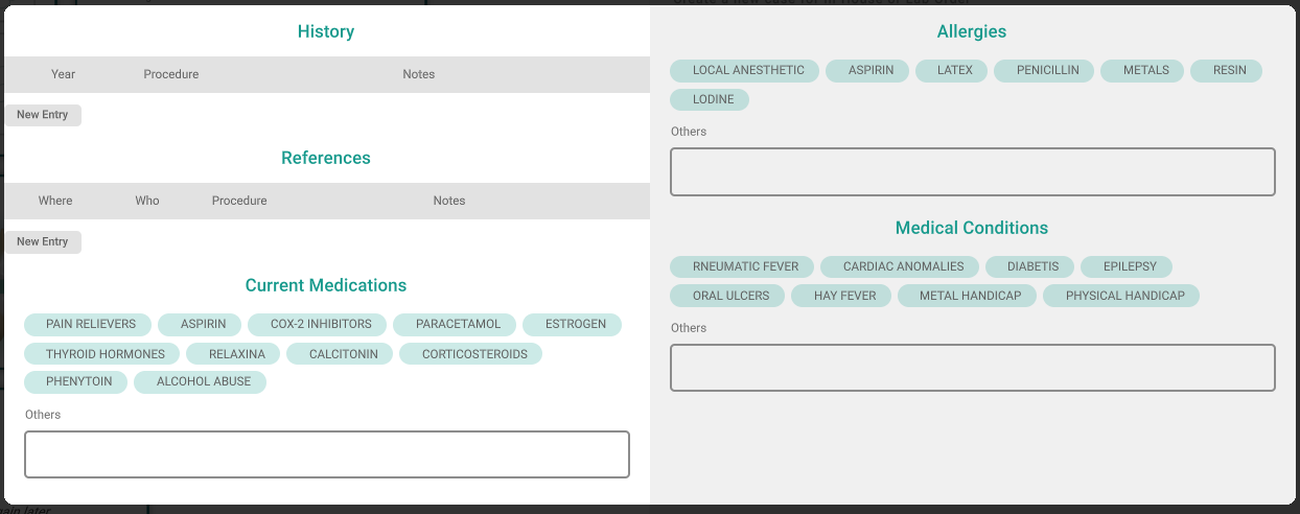
Allergies, medications and conditions
Three sections — Allergies, Current Medications, and Medical Conditions — are chip lists. Click a chip to mark that it applies; click it again to clear it. Each section has an Others box for anything not in the chips.
History and references
Two sections are tables you build row by row:
- History — past procedures, with a year, the procedure, and notes.
- References — referrals, with where, who, the procedure, and notes.
Click New Entry to add a row, fill it in, and use the row's trash button to remove one.
Tips
- Your changes save when you close the popup, not as you type.
- The History year takes up to four digits.
- If the fields are grey and the chips don't respond, your account can only view a patient's medical information. Ask your office manager for permission to edit it.