System
The System group of Settings holds how the app behaves while you work, the language it shows, and the product information for this installation.
Open it from the account menu: ⋮ → Settings, then System in the left navigation.
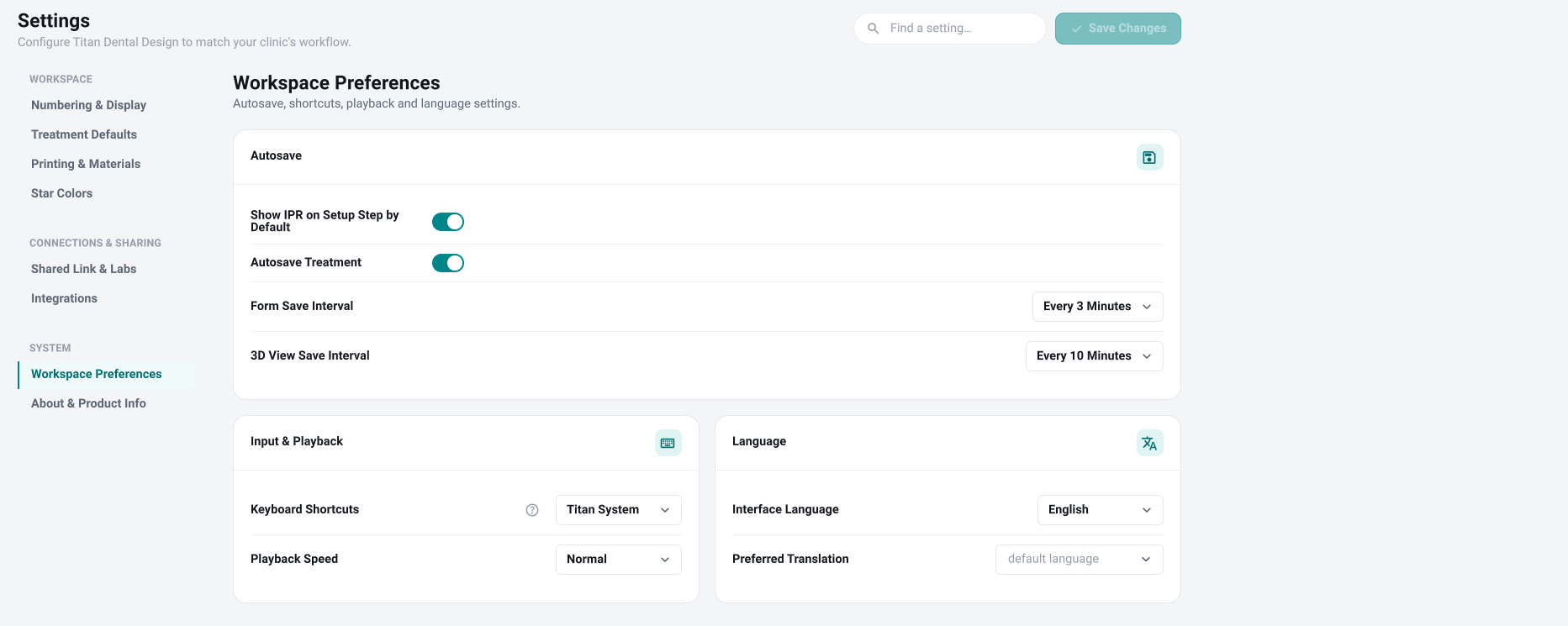
Workspace Preferences
- Autosave: whether IPR shows on the setup step by default, whether treatments autosave, and how often the forms and the 3D view are saved.
- Input & Playback: the keyboard shortcut scheme (with a help link for each scheme) and the staging playback speed.
- Language:
- Interface Language changes the language of the app right away — it doesn't wait for Save Changes.
- Preferred Translation is the language you'd like a planner to translate findings into. It's separate from the interface language.
About & Product Info
A read-only card with the regulatory identifiers for this installation: the product name, the version, the UDI, and the FDA clearance number. Keep the software up to date to stay compliant. There's nothing to change here.
Saving
Workspace Preferences are kept when you click Save Changes at the top, or when you close the window; Save Changes is greyed out until you change something. These preferences apply only to you, not to the whole office. The Interface Language applies immediately. About & Product Info is read-only.